Payment errors often begin before an invoice reaches accounts payable (AP). Duplicate supplier records, missing purchase orders, and approval gaps can remain unresolved as transactions move through the procure-to-pay (P2P) process and surface only after payment.
Ardent Partners reported an average invoice exception rate of 18.4% in 2025. Invoice exceptions require handling outside the standard processing path, making their resolution, manual changes, and overrides important areas for audit review.
The guide below explains how to conduct a procure-to-pay audit step by step, where AP recovery fits when overpayments and credits are in scope, and how to trace confirmed losses back to the process or control weakness that caused them.
Key Takeaways:
- A P2P audit needs to follow the transaction end to end: Supplier setup, purchasing, approvals, receipt, invoicing, and payment can each contribute to errors that surface later.
- Control testing and recovery testing need to stay separate: A control failure doesn’t automatically mean money was lost, while an overpayment or unresolved credit can still exist even when standard controls worked as designed.
- Potential recoveries need validation before action: Duplicate matches, supplier credits, and other anomalies need supporting records or supplier confirmation before they become confirmed claims.
- Recovered losses should be traced back to their cause: Each confirmed recovery should connect to the process or control weakness that caused it so corrective action addresses the source of the loss.
- apexanalytix strengthens the recovery-focused part of a P2P audit: apexanalytix combines duplicate analysis, supplier statement review, claim validation, and recovery support to identify amounts that may still be recoverable.
What Is a Procure-to-Pay Audit?
A procure-to-pay audit reviews the data, transactions, and controls across the purchasing and payment process. Its purpose is to find control gaps, payment errors, and other issues that can create financial loss.
A P2P audit can span both procurement and AP, but it’s not the same as a procurement audit or an AP recovery audit.
Procure-to-pay audit vs. procurement audit vs. AP recovery audit
While P2P, procurement, and AP recovery audits are related concepts, they differ in scope and purpose:
| Audit |
Primary focus |
Main question |
| P2P audit |
Purchasing and payment activity across the P2P process |
Where are control gaps or transaction errors creating payment risk or financial loss? |
| Procurement audit |
Procurement activities, policies, and controls |
Are procurement activities following required policies and controls? |
| AP recovery audit |
Historical AP transactions and supplier accounts |
What overpayments, credits, or other amounts can still be recovered? |
An AP recovery audit can form part of a broader P2P review when financial recovery is one of the objectives. The P2P audit can then trace confirmed losses back to the process stage or control weakness that contributed to them.
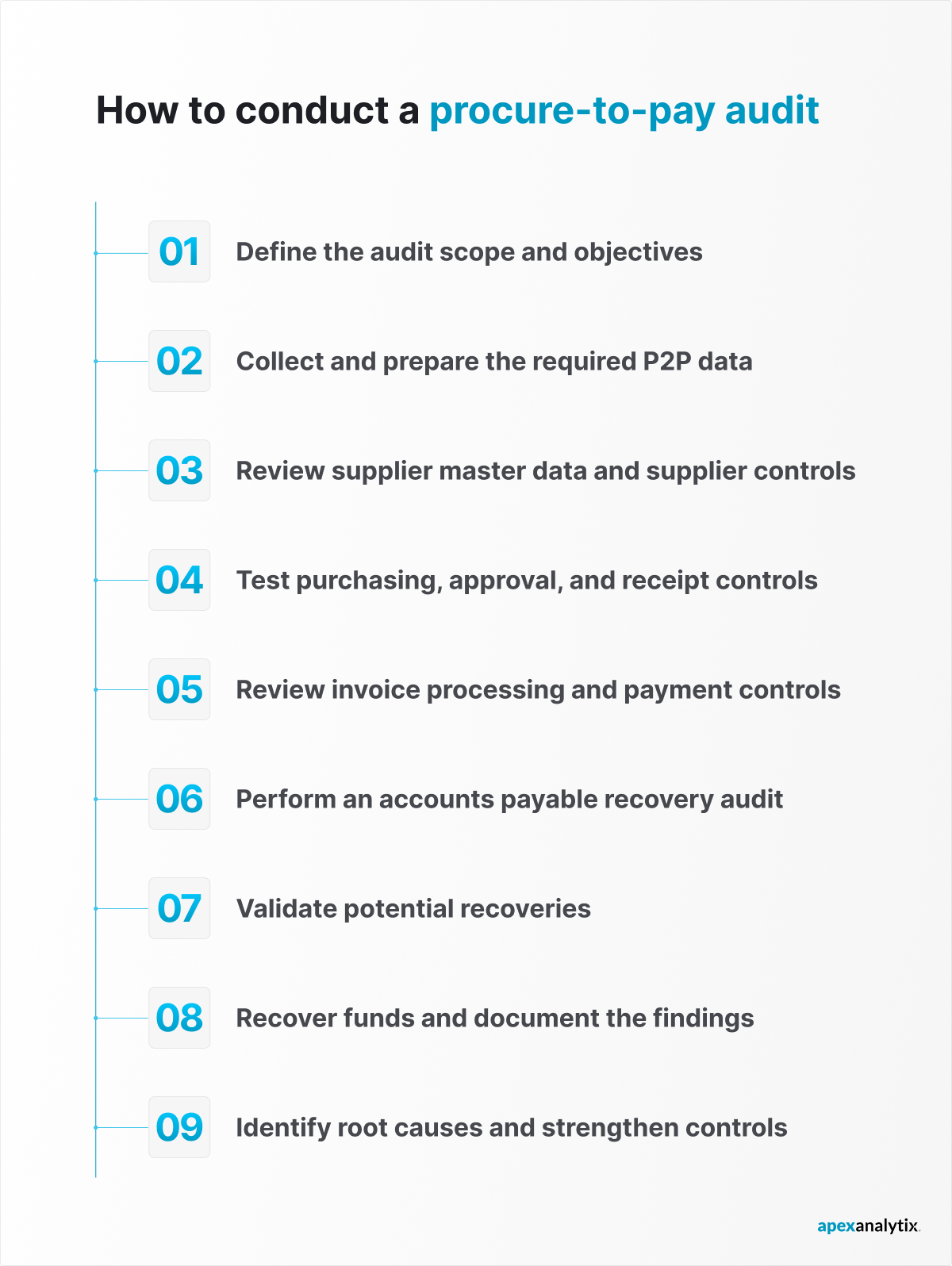
How to Conduct a Procure-to-Pay Audit in 9 Steps
A P2P audit should move from defining the review population to testing controls, identifying recoveries, validating findings, and tracing confirmed losses back to their cause.
The nine steps below describe the full review in detail:
1. Define the audit scope and objectives
Audit scope determines which transactions, systems, and controls to test. Define the objective before selecting the review population.
Set clear boundaries for:
- Time frame: The transactions included
- Business scope: The legal entities, business units, locations, and regions covered
- Systems: The enterprise resource planning (ERP) systems, procurement platforms, invoice channels, and payment systems included
- P2P stages: The parts of the process being tested
- Objectives: Control assurance, financial recovery, supplier data review, fraud exposure, or a combination
- Exclusions: Areas outside the audit objectives
The Institute of Internal Auditors (IIA) recommends setting clear boundaries around the processes, locations, and time period covered so the scope can meet the audit’s objectives.
If financial recovery is included, define the historical payments and supplier accounts under review from the start.
2. Collect and prepare the required P2P data
A reliable audit depends on reconstructing each transaction from supplier setup to payment. Invoice data alone leaves gaps because supporting records may sit in another system or business unit.
A core data request can include:
| Data set |
What it shows |
| Supplier master and change history |
Supplier identity, status, banking details, duplicate records, and changes over time |
| Requisitions, purchase orders (POs), and approvals |
How spending was requested and authorized |
| Goods receipts and service confirmations |
What goods or services were recorded as received |
| Invoices and exception records |
Invoice details, matching results, manual changes, and unresolved exceptions |
| Payment records |
What was paid, when, to whom, and under which payment reference |
| Credit memos and supplier statements |
Credits, offsets, and amounts that may remain with suppliers |
Data from different systems may need to be standardized before testing because the fragmentation behind many P2P challenges can complicate the audit data request. The same supplier can appear under different IDs, while invoice numbers may contain different prefixes, spaces, or punctuation.
3. Review supplier master data and supplier controls
Supplier records should be reviewed before the transactions attached to them because duplicate or unlinked supplier identities can make later transaction comparisons unreliable. Incomplete or improperly changed supplier information can also create risk even when an invoice passes payment controls.
Look for:
- Duplicate supplier records
- Repeated identifiers such as tax IDs, addresses, or bank accounts
- Incomplete supplier information
- Unapproved or unvalidated bank account changes
- Payments to inactive suppliers
- Missing onboarding approvals or due diligence records
- Unusual supplier relationships
Supplier approval records can also show whether required supplier risk and third-party risk checks were completed before onboarding.
The audit should verify that required due diligence is reflected in the supplier’s approval record and that material changes, including banking updates, followed the required review process.
4. Test purchasing, approval, and receipt controls
Purchasing records show whether a transaction was authorized before reaching AP and provide evidence of what was ordered and received.
Check when the PO was created, who approved it, and whether the approval level matched company policy.
Transactions close to approval thresholds deserve extra attention. Several related purchases from the same supplier, each just below an approval limit, may indicate that a larger purchase was divided to avoid additional approval.
For receipt testing, compare the recorded quantity or service completion with supporting evidence. Where three-way matching applies, connect:
PO → receipt or service confirmation → invoice
Trace differences in amount, quantity, timing, or documentation to the related exception or approval.
5. Review invoice processing and payment controls
Follow the invoice from receipt through payment release.
Relevant fields and events include:
- Matching results
- Exception reasons
- Duplicate-payment flags
- Approval timestamps
- Manual changes
- Overrides
- Payment authorization
- Beneficiary information
- Reissued or canceled payments
Test segregation of duties around sensitive payment activities. Review role assignments and change logs for cases where the same user can update supplier bank details and release the related payment, or where the required compensating approval is missing.
Exceptions and overrides can reveal where controls are weaker in practice than on paper.
Keep two questions separate:
- Control testing: Did the required control operate as designed?
- Recovery testing: Did an incorrect payment or unclaimed credit remain despite those controls?
Standard controls may miss relationships across different supplier records, invoice formats, systems, or business units. Two payments can relate to the same obligation without looking identical inside one system.
6. Perform an AP recovery audit
AP recovery testing examines historical transactions and supplier accounts for money the company may still be owed.
Keep potential value, validated value, and recovered value separate. A potential match isn’t a confirmed claim, and a confirmed claim isn’t recovered cash until the balance has been resolved.
Duplicate payment analysis
In 2025 AP research from the Shared Services & Outsourcing Network (SSON), 44% of respondents identified duplicate payment rate as an important AP metric to track.
When tracking duplicates, focus on transactions that resulted in payment. A duplicate invoice blocked before payment is a control success, while only a duplicate that was paid can become a recovery.
Potential duplicates generally fall into two groups:
- Data variations: The same obligation recorded under different supplier IDs, invoice formats, amounts, or dates
- Process events: The same obligation paid across systems or entities, resubmitted through another channel, or paid again before the original payment was canceled or returned
Cross-system reconciliation is especially important when business units use separate supplier records or payment environments.
Supplier statement and credit analysis
Internal payment records don’t always show the supplier’s current account balance. Supplier statements provide another source of evidence, including credits and offsets recorded by the supplier.
Reconcile statements against the AP ledger and investigate:
- Open supplier credits
- Missing credit memos
- Credits tied to returned goods
- Credits related to canceled invoices or services
- Unapplied offsets
- Discounts that remain due
Recovery testing can also include payments linked to canceled invoices or services when the audit scope and supporting records establish that the amount shouldn’t have been paid.
7. Validate potential recoveries
Before pursuing recovery, confirm each candidate against the underlying records.
For a potential duplicate, trace both payments to the related invoices, POs, receipts, and payment records. Check for:
- Refunds
- Reversals
- Voids
- Credit memos
- Payment returns
- Later adjustments
Any of these may already have corrected the apparent duplicate.
For an outstanding credit, reconcile the supplier balance with the internal ledger and tie returns, cancellations, rebates, or other events to the amount under review.
8. Recover funds and document the findings
Once you validate an amount, record how you’ll resolve it. The outcome may be a supplier refund, approved credit, or another documented adjustment.
A recovery record needs enough detail to recreate the finding later:
| Record |
What to document |
| Source transaction |
Original invoice, payment, supplier, and entity |
| Issue type |
Duplicate payment, outstanding credit, missed discount, or other validated error |
| Validated amount |
Amount confirmed as owed |
| Evidence |
Supporting records and supplier confirmation when required |
| Recovery status |
Open, confirmed, refunded, credited, or closed |
| Owner |
Person or team responsible for the next action |
Keep the audit trail intact after the refund or credit arrives so the final record shows what was found, how it was validated, and how it was resolved.
9. Identify root causes and strengthen controls
Recovering the money resolves the financial finding, but it doesn’t explain why the loss occurred. Trace each confirmed recovery backward until the process failure or control weakness becomes clear.
Root causes can sit in supplier master data, invoice submission, approval or override rules, system handoffs, or payment cancellation processes.
Outstanding credits can point to different failures, such as returns that never reached AP or supplier credits that weren’t recorded.
The corrective action needs to match the cause. Another invoice check won’t solve a duplicate created by poor supplier master data. The same principle applies to outstanding credits: supplier onboarding controls won’t fix a returns process that fails to pass credit information to AP.
For each material root cause, record:
- The process stage involved
- The control that failed or was missing
- The team that owns the control
- The corrective action required
- The method for checking whether the problem returns
Each material recovery should connect to its root cause, control owner, and required change. Follow-up testing can then show if the same type of loss continues.
Relevant P2P KPIs can also help track whether corrective changes improve payment accuracy, exception rates, or recovery results over time.
How apexanalytix Supports AP Recovery Audits
When financial recovery is part of a broader P2P audit, apexanalytix focuses on historical AP transactions and supplier accounts to identify amounts that may still be recoverable.
The platform supports recovery-focused work across several parts of the audit:
- Duplicate analysis: Identify potential duplicate payments and outliers that can pass standard matching controls.
- Supplier statement analysis: Review supplier statements for credits, offsets, and other amounts that may not appear clearly in internal AP data.
- Recovery validation: Confirm potential claims with suppliers before pursuing recovery.
- Claim resolution: Track supplier communication and recovery activity through resolution.
Results
One apexanalytix case study follows a global pharmaceutical company where mergers, reorganizations, and shared-services changes contributed to P2P process breakdowns and spikes in overpayments.
apexanalytix provided recovery audits, supplier statement reviews, and overpayment prevention across multiple regions. The engagement has produced more than $200 million in audit recoveries, while the technology has identified and prevented more than $600 million in additional overpayments.
Is financial recovery one of your procure-to-pay audit objectives?
Contact apexanalytix to discuss how its AP Recovery Audit service could fit into your review.
FAQ
1. How often should a procure-to-pay audit be performed?
Set P2P audit frequency according to risk, process changes, and prior findings, with higher-risk areas reviewed more often. ERP migrations, acquisitions, shared-services transitions, or rising payment exceptions can justify a targeted review before the next scheduled audit.
2. How far back should a procure-to-pay audit review transactions?
Set the lookback period based on the audit objective and the transactions that can still be supported by reliable records. When financial recovery is included, also consider recovery rights and whether you can still validate older transactions.
3. Should a procure-to-pay audit review every transaction or use sampling?
Use full-population analysis for data-driven tests when reliable structured transaction data is available, and sampling where full testing isn’t practical. Sampling is more useful for manual controls, supporting documents, or processes that can’t be tested consistently across the entire data set.
4. What problems can make a procure-to-pay audit difficult?
Common P2P audit problems include fragmented data, missing supporting records, and inconsistent processes across business units. Unclear ownership or delayed supplier confirmation can also make findings harder to validate.
5. Who should be involved in a procure-to-pay audit?
The core team should include internal audit or finance, AP, procurement, supplier master data owners, and relevant system or control owners. Legal, compliance, treasury, or business-unit leaders can join when findings involve contracts, supplier risk, payment authorization, or local requirements.