Duplicate payments in accounts payable persist even in organizations with established controls. When supplier records are fragmented across multiple vendor IDs or invoices reach AP through multiple channels, standard field-level matching has no mechanism to connect them, and the same obligation gets paid twice without a single flag firing.
According to apexanalytix’s 2026 Global Overpayment Report, which analyzed $3.25 trillion in spend across hundreds of global enterprises, duplicate payments account for 18% of lost profit, making them the single largest category of AP leakage. This means that for $1 billion in annual AP spend, even a modest duplicate rate produces millions in avoidable outflows.
This guide covers the structural causes of payment issues in enterprise AP environments and the layered control stack needed to prevent duplicate payments before funds leave the organization.
Key Takeaways:
- Standard ERP controls miss the duplicates that cost the most: The most expensive duplicates tend to differ in invoice number, vendor record, or submission channel, and exact-match logic isn’t designed to connect them.
- Dirty vendor master data is a root cause, not a side issue: When the same supplier exists under multiple records, invoice-level controls can’t catch the duplicate no matter how well they’re configured.
- No single control is enough, because each one covers different failure modes: Preventing duplicate payments requires a layered approach that addresses data quality, intake, matching, and cross-system visibility together.
- ERP migrations and acquisitions require extra attention: Both events introduce conditions that consistently spike duplicate payment rates, often when controls are already under strain.
- apexanalytix addresses duplicate payment risk before and after funds leave: apexanalytix combines pre-payment analytics and recovery audit capabilities so enterprises can stop duplicates at the source and recover those that pre-payment controls missed.
Why Standard Controls Miss the Most Expensive Duplicates
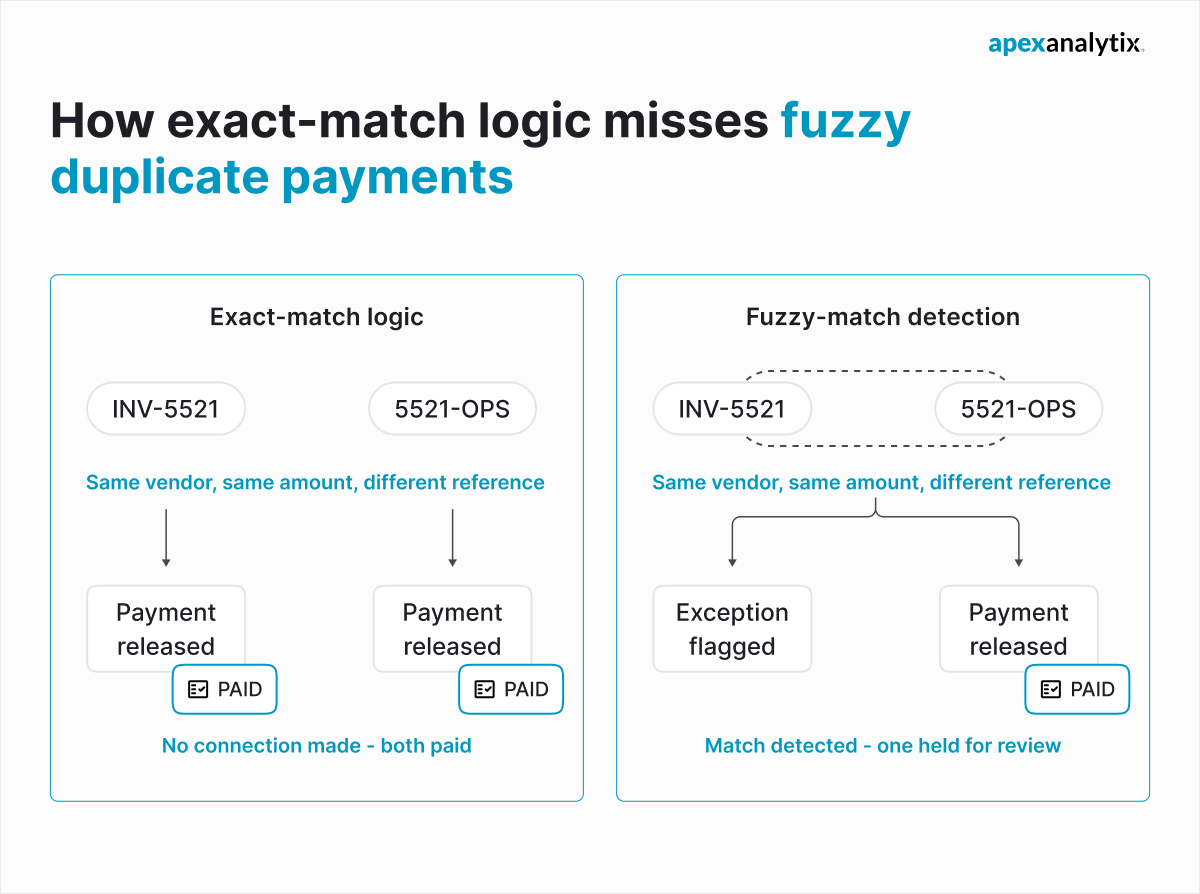
Standard ERP duplicate controls are built around exact-match logic, flagging a transaction only when the invoice number, supplier, and amount all match an existing record exactly. A one-character difference in a reference number or a mismatched vendor record ID is enough for the system to treat two records as distinct transactions, even when both represent the same payment obligation.
For example, a supplier submits an invoice by email, receives no payment confirmation, and resubmits through the supplier portal under a slightly different reference (“INV-5521” the first time, “5521-OPS” the second). Both enter the AP workflow independently, neither triggers a match, and both get paid.
Fuzzy duplicates are far more common than exact repeats and far more likely to clear undetected. The vendor, amount, and underlying obligation all match, but the reference numbers or submission path differ just enough for standard controls to treat them as separate transactions.
Why Duplicate Payments Happen: Root Causes by Type
Most duplicate payments result from a combination of process failures and system restrictions that let the same invoice clear twice without triggering a flag.
The table below shows what the causes are, how they produce a duplicate, and where standard controls fail to catch it:
| Cause |
How it creates a duplicate |
Where controls miss it |
| Multiple invoice submission channels |
The same invoice arrives through multiple channels, with each version entering the workflow as a separate transaction |
Missed when channels feed separate inboxes or systems |
| Dirty vendor master data |
The same supplier exists under two records, causing invoices to route to each without a cross-record check |
Missed without cross-record supplier deduplication |
| Manual data entry errors |
A rekeyed invoice number is mistyped, creating a second record that exact-match logic treats as new |
Missed by exact-match logic until manual reconciliation |
| Supplier resubmissions |
A supplier resends an unpaid-looking invoice under a new reference number |
Missed by field-level matching when the reference differs |
| Missing or unmatched purchase orders |
Without a PO to anchor the transaction, invoice matching falls back to exact-match logic with no additional validation layer |
Missed without three-way matching enforcement |
| Multi-entity and multi-ERP environments |
The same invoice is processed in separate systems, each operating without visibility into the other |
Missed when duplicate checks run only within a single ERP instance |
| ERP migrations and M&A activity |
Overlapping supplier records and historical transactions are consolidated without deduplication |
Missed when migrated data isn’t validated before activation |
Dirty vendor master data is in a different category from the other causes. When the same supplier exists under multiple records (for example, “Acme Corp,” “Acme Corporation,” and “Acme Corp Ltd”), each record processes independently. Payments made against one ID have no connection to those made against another.
ERP migrations and post-acquisition integrations are also worth singling out. Both events push duplicate payment rates up sharply, and they tend to do so at the exact moment controls are already under strain from overlapping supplier records and teams split across two systems.
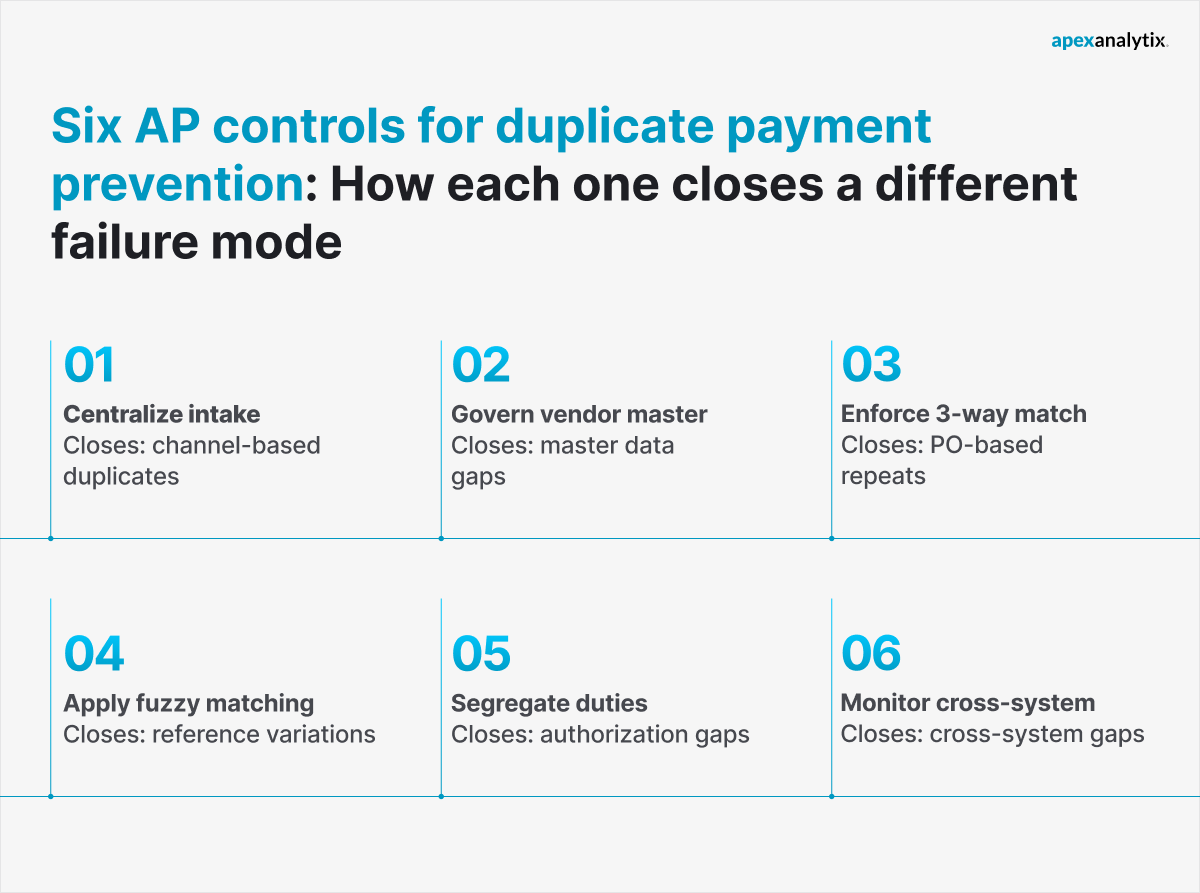
How to Prevent Duplicate Payments: 6 AP Controls
The six controls below each target a different way duplicates slip through. Used together, they close the failure modes that any one control leaves open.
1. Centralize invoice intake
Centralizing all invoice submission channels into a single intake point is the furthest-upstream control available to AP teams. When email, supplier portal, EDI, and paper submissions all feed into the same system, a duplicate check applies to every incoming invoice regardless of how it arrived.
When a supplier submits the same invoice through two channels, both versions still arrive, but they land in the same system where matching logic can compare and flag them.
Read more: Supplier Invoice Management Guide: Benefits & Challenges
2. Clean and govern the vendor master
Dirty vendor master data is a structural precondition for duplicate payments, setting invoice-level controls up to fail regardless of how well they’re configured.
The following practices help avoid this scenario:
- Deduplicate supplier records regularly by comparing name variations, tax IDs, and bank account numbers.
- Validate banking details before a new supplier record goes active.
- Restrict who can create or edit a vendor record, and require approval for changes.
- Flag entries with shared addresses, phone numbers, or remittance details for review.
Manipulated remit-to records are frequently used to redirect payments to unauthorized accounts, and bank account validation at onboarding addresses both duplicate-record risk and fraud risk.
Read more: What is Supplier Data Management and How Does it Work?
3. Enforce three-way matching
Three-way matching requires every invoice to reconcile against a purchase order and a goods receipt before payment is released. When an invoice has already consumed a PO line, a resubmission has nothing left to match against and lands in an exception queue instead of a payment run.
Two independent references make it structurally harder for a duplicate to clear than single-field exact matching alone. However, this only applies to purchase-order-based spend. Non-PO invoices and one-off purchases fall outside of that scope, so treating three-way matching as the primary duplicate prevention control leaves a significant share of AP spend exposed.
4. Apply fuzzy-match detection
Fuzzy-match detection works by normalizing invoice data before running comparisons. The tolerance parameters need to be calibrated to the organization’s invoice formats and supplier base. A threshold set too narrowly misses real duplicates, while one set too broadly creates false positives that require manual review and slow AP processing.
The goal is a threshold that flags instances like “PO-8801” and “8801-FINAL” from the same vendor for the same amount as a single obligation, without flagging invoices that represent separate transactions.
5. Enforce segregation of duties
Segregation of duties is a core control activity in AP environments, and one of the most consistently exploited weaknesses when absent. Removing a single person’s ability to both enter a supplier record and approve payment against it reduces duplicate payment risk and fraud exposure.
The following role separations apply this principle to AP payment workflows:
- Supplier creation and invoice approval assigned to different roles
- Invoice approval and payment release divided between separate people
- Bank account changes restricted to a designated team with mandatory second-person review
- Overrides and exceptions logged and routed for supervisory approval
Besides duplicate prevention, these controls also close the control weakness billing fraud schemes exploit, strengthening the audit trail when exceptions occur.
Read more: Identifying and Preventing Payment Fraud: 15 Key Data Points
6. Monitor across ERP systems and business units
Cross-system monitoring consolidates payment activity from every ERP instance, subsidiary, and supplier record into a single analysis layer that operates across all systems, rather than being scoped to any single one. A duplicate processed in two separate systems becomes visible as a duplicate, whereas each system on its own would record it as a unique transaction.
Organizations that monitor only their primary ERP while excluding regional systems or acquired entities lack visibility into a considerable portion of their payment activity. The scope should reflect where invoices are processed, including legacy systems that predate a migration and haven’t yet been fully decommissioned.
Read more: Procure-to-Pay Challenges in 2026
Key Metrics for Tracking Duplicate Payment Controls
Cross-industry benchmarking data from APQC shows that top-performing AP organizations process 98% of disbursements error-free, versus 95% at median and 88% at the bottom quartile. At enterprise payment volumes, a two-percentage-point difference in error rates translates to material financial exposure.
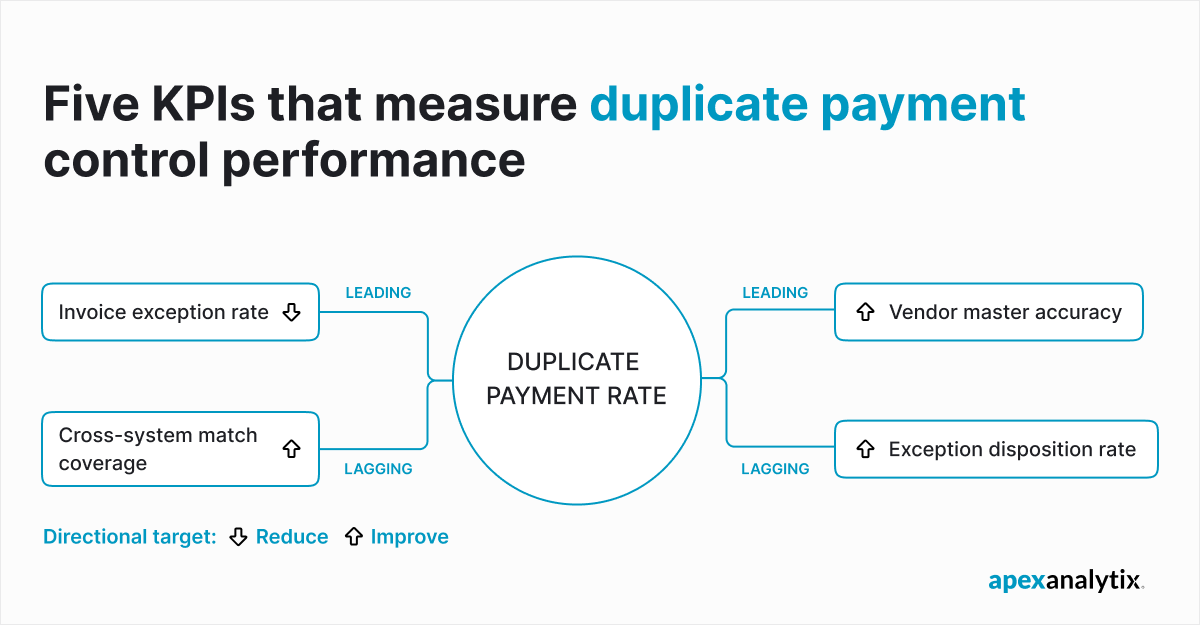
The five metrics below give AP leaders a direct view of how well each control is performing:
- Duplicate payment rate: The percentage of total payments identified as duplicates in a given period, split between pre-payment blocks and post-payment recoveries
- Invoice exception rate: The share of invoices that fail standard matching and require manual handling, serving as a proxy for upstream data quality and matching effectiveness
- Vendor master record accuracy: The percentage of active supplier records with validated tax IDs, confirmed banking details, and no open deduplication flags
- Cross-system match coverage: The share of total payment activity covered by cross-system duplicate detection, as a percentage of total multi-ERP spend
- Override and exception disposition rate: How quickly flagged exceptions are resolved, and what share result in confirmed duplicates versus legitimate payments
When Prevention Isn’t Enough: The Role of Recovery
Even mature AP environments with layered controls don’t catch every duplicate. Payments that predate a control improvement or that cleared through a system outside the monitoring scope create historical exposure that pre-payment controls can’t retroactively address.
AP recovery audits complement pre-payment controls by examining historical transactions (often spanning multiple years across systems and supplier populations) to find duplicates that standard controls missed. Recovery audit findings also identify which control weaknesses produced the most exposure, giving AP teams a basis for prioritizing prevention improvements and feeding that intelligence back into the controls that generated it.
Prevention and recovery work best in tandem, with each producing data that refines the other.
Read more: 80% of an AP Recovery Audit’s Value Isn’t in Your ERP. Here’s How apexanalytix Finds It
How apexanalytix Addresses Duplicate Payment Risk
apexanalytix gives AP teams pre-payment controls and recovery audit capabilities in a single platform, covering the exposure that analytics and recovery alone each leave unaddressed.
The Overpayment Prevention solution analyzes supplier records, invoice data, and payment history before funds are released. AI trained on almost 40 years of recovery audit outcomes scores each transaction by duplicate likelihood and financial impact. High-risk items are flagged for review before payment clears.
The platform’s recovery audit program examines historical AP transactions across ERP systems, subsidiaries, and supplier populations to find duplicates that pre-payment controls didn’t catch. Across a database of 280 million supplier records, apexanalytix identifies the right contact at each supplier to recover confirmed overpayments, including duplicates that prior providers missed.
Each engagement delivers a root-cause analysis alongside the recovered amounts, giving AP teams specific evidence of which control weaknesses drove the most exposure. This way, corrective action targets the source, not the symptom.
How much duplicate payment exposure is your current control environment leaving unaddressed?
Contact apexanalytix to see how leading enterprises protect trillions of dollars in annual AP spend with pre-payment analytics and recovery audits built on the same supplier intelligence.
FAQ
1. How does three-way matching reduce duplicate payments?
It prevents paying the same obligation twice by requiring every invoice to clear against a purchase order and a goods receipt before payment releases. Once a PO line is matched and closed, a resubmitted invoice has no open balance to match against and is held as an exception instead.
2. What should AP teams look for when evaluating duplicate payment controls?
Look at scope first: controls that run only within a single ERP instance miss cross-system duplicates by design. Also, confirm that matching logic applies to normalized data, since most enterprise duplicates involve invoice number variations or different submission paths and are rarely exact repeats.
3. Why do duplicate payment rates increase after an ERP migration or acquisition?
Both events introduce overlapping supplier records and historical transactions from two environments, and controls calibrated for one system may not apply correctly to the consolidated data. The same supplier frequently appears under multiple records after consolidation, creating conditions for duplicates that didn’t exist before.
4. What is the difference between a duplicate payment and an overpayment?
A duplicate payment is a specific type of overpayment where the same invoice or obligation is paid more than once. Other overpayments (pricing errors, payments against canceled invoices, unapplied credits) involve a single payment that exceeds what was owed.
5. How do duplicate payment controls connect to fraud prevention?
Weak vendor master governance and missing segregation of duties create the conditions for both honest duplicates and intentional billing fraud. The ACFE’s 2026 Report to the Nations found that billing schemes account for 21% of asset misappropriation cases, and the controls that stop honest duplicates address the same structural vulnerabilities.